FollowMyHealth®
- 4.7
- Rating
- 5.00M
- Installs
- Free
- Price

 Analysis by App-foxy
I use patient portals when I want one practical answer: what has my care team recorded, and what can I do next without making a phone call? FollowMyHealth® is built around that question. It is a free medical app from Veradigm LLC that brings a person’s healthcare information into a Universal Health Record, provided the relevant healthcare organization supports the connection. In everyday use, I found it most useful as a place to review care information, handle routine communication, and prepare for appointments rather than as a replacement for urgent medical help.
The app has been available since 2012 and has grown into a widely used service, with an average rating of 4.8 from around 187 thousand ratings and more than 5 million installs. Those figures suggest that many people find the basic portal experience dependable, but they should not be mistaken for a guarantee that every clinic offers the same tools. The quality of the experience depends heavily on which healthcare organizations are connected to your account and what they choose to make available.
How I use the portal as a dependable healthcare routine
My recommended starting point is simple: sign in, identify the organization connected to the account, and learn where the main records and communication areas live. I would not begin by exploring every screen. A patient portal becomes useful when it answers recurring questions quickly, such as whether a visit summary is available, whether a message has been answered, or whether information from a recent encounter has appeared.
You May Also Like

 Pandora - Music & Podcasts
Pandora’s Music Is Easy to Start, but Harder to Recover
Pandora’s strength is its low-effort path from a seed to a station. Its weak spot is how much confidence it asks you to place in connection, setup, and quiet recovery.

 8 Ball Pool
 Is Built on Rivalries, Rematches, and Routine
A close look at the rivalries, rematches, shared routines, and unanswered safety questions that turn a quick pool match into a persistent mobile community.

 Samsung Music
’s Quiet Strength Is Playing What You Already Own
Its reach comes less from spectacle than from dependable access to a personal library. That simplicity is both the app’s strongest retention engine and its ceiling.

 AccuWeather: Weather Radar
AccuWeather Review: A Quick, Clear Forecast for Everyday Decisions
For everyday plans, the best forecast is the one you can understand quickly. AccuWeather makes rain timing, radar, and local conditions easy to act on, with a few trade-offs.

 Hill Climb Racing
Why Hill Climb Racing Still Turns Crashes Into One More Run
A tiny car, a bumpy hill and one more upgrade: Hill Climb Racing keeps resurfacing because its simple chaos makes every near-miss feel personal.

 AliExpress - Shopping App
AliExpress Makes Global Shopping Feel Personal, but Shoppers Bear the Risk
AliExpress turns a global marketplace into a pocket-sized discovery engine. Its reach is useful, its shopping loop compelling, and its trade-offs easy to miss.
More From Our News Desk
View All News


That makes FollowMyHealth® different from a general health journal. A journal is useful for recording symptoms, blood pressure readings, questions, or medication notes yourself. This app is centered on information shared through participating healthcare providers. I treat it as a companion to the clinical record, not as a private notebook and not as a diagnostic tool.
A realistic example is a follow-up visit after a change in treatment. Before leaving the appointment, I might make a short list of what I expect to see later: the visit documentation, instructions, and any communication from the office. Instead of repeatedly calling the clinic, I can check the portal at a sensible time, review what has been posted, and keep a note of anything that needs clarification. That workflow is less stressful than relying on memory, especially when several appointments or providers are involved.
The first important habit is to read the actual record rather than relying only on notifications. An alert can tell me that something changed, but the surrounding details may be in a different part of the portal. I also avoid assuming that a missing item means the care team forgot it. Posting practices vary, and some information may appear later or be available only through the organization’s chosen setup. If something matters medically or affects a deadline, I contact the provider instead of treating the app as the final authority.
FollowMyHealth is especially useful for people who see more than one participating provider and want a single place to begin looking. It can reduce the need to remember separate portal names and separate routines. Still, “one place” does not automatically mean that every part of a person’s healthcare will appear there. I would check the connected organizations carefully before depending on it for a complete history.
The best first-week routine
During the first week, I would use the app in short sessions rather than trying to organize my entire medical life at once. First, I would confirm that I can sign in reliably. Next, I would inspect the account areas that matter most to me, such as records and communication. Then I would open a recent item and learn how the app presents dates, provider names, instructions, and status information.
This small orientation prevents a common mistake: opening the app only when something feels urgent and then trying to understand its layout under pressure. A healthcare portal is easier to use when I already know where to look. I also keep the app’s role clear in my mind. It helps me access and manage healthcare information; it does not decide whether a symptom is dangerous or replace emergency services.
For families, the setup deserves extra attention. If I am helping another person manage care, I would make sure I understand whose account is active before reviewing anything. I would not casually share a login or leave a session open on a shared device. The convenience of a portal is valuable, but medical information deserves the same care I would give paper records or a conversation with a clinic.
Settings and account habits worth checking
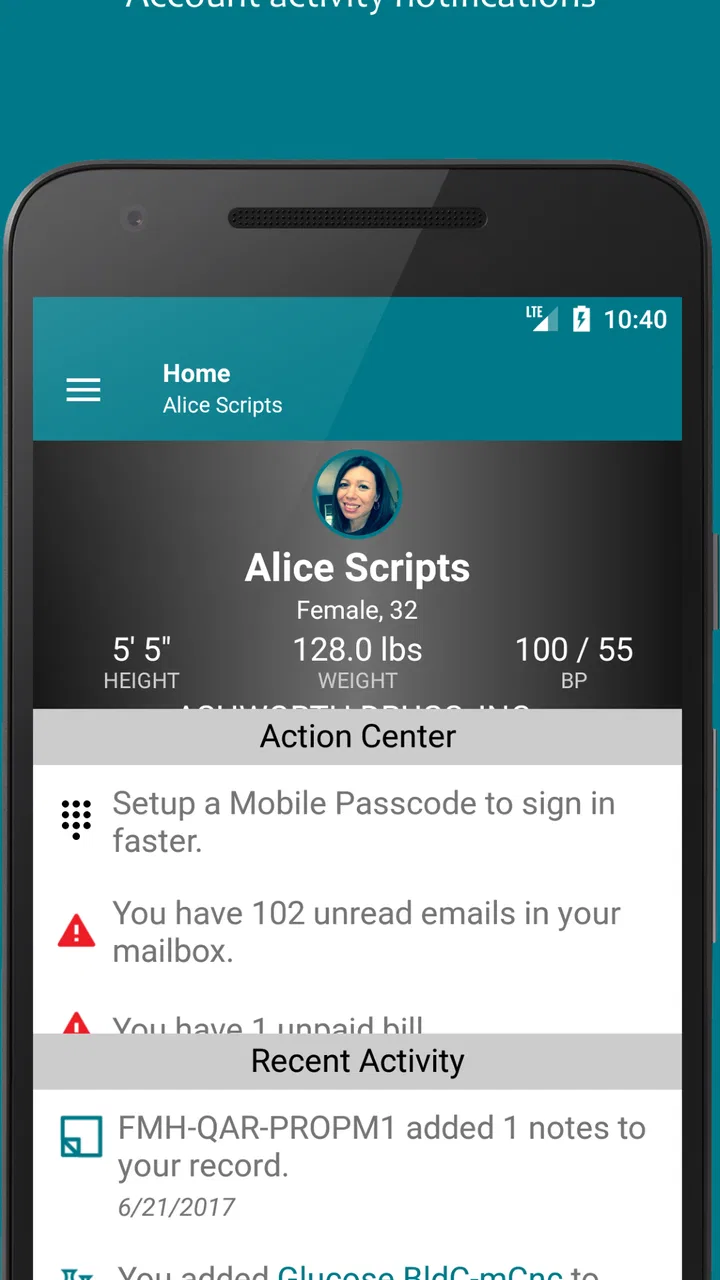
The most valuable settings are the ones that affect whether I notice important activity. I check how the app handles notifications, because a portal is much less useful if I never know that a message or record update is waiting. At the same time, I avoid treating every notification as an instruction to act immediately. I use alerts as prompts to review the app, then judge the content itself.
I also review which healthcare organization or organizations are connected. This is a more important check than cosmetic preferences. If I recently changed providers, moved, or began seeing a specialist, I want to know whether that organization is represented in the account. A single portal can feel comprehensive while still reflecting only the participating parts of a person’s care.
Another useful habit is keeping contact details current where the app and connected organization allow it. A patient portal can only support communication effectively when the account information is accurate. I would review this after changing a phone number or email address, and I would avoid assuming that updating a profile in one place automatically changes every provider’s records.
Security settings are worth treating as part of the medical workflow, not as an afterthought. I use a strong, unique password and protect the device itself. If the phone is shared, borrowed, or frequently left unattended, I am more cautious about keeping the account open. I also sign out when appropriate. These are ordinary precautions, but they matter more for a healthcare account than for a casual shopping app.
The app is free, which removes a financial barrier for people who want to try it. That does not mean every healthcare service connected to it is free, nor does it change the billing relationship with a provider. I see the app as an access tool, not as a payment promise. That distinction helps avoid confusion when a record includes charges, insurance information, or instructions from a clinic.
Faster patterns for repeat use
Experienced use is less about tapping quickly and more about asking the same questions in the same order. When I open the app, I start with what changed since my last visit. I then review communication that needs a response and only afterward browse older information. This keeps the session focused and reduces the chance of overlooking a new item among familiar records.
I also prepare messages before opening the portal. I write down the main question, the relevant date, and the action I am requesting. For example, instead of sending a vague note about a treatment concern, I would explain when the issue began, what changed, and what I need clarified. A concise message is easier for a care team to understand and makes the portal more useful than a stream of incomplete follow-ups.
One of my favorite practical habits is using the portal before an appointment to collect questions, then checking it afterward for the information I expected the visit to produce. This creates a repeatable loop: prepare, attend, review, follow up. It is particularly helpful when I am managing several conditions and do not want every detail to live in my head.
For recurring care, I would check the app at a consistent time rather than refreshing it constantly. A short weekly review may be enough for routine matters, while an active treatment change may justify closer attention according to the provider’s instructions. The key trade-off is balance: checking too rarely can cause me to miss communication, but checking compulsively can turn a useful tool into another source of anxiety.
When information appears unclear, I capture the question in plain language before contacting the provider. I do not reinterpret clinical wording based on a quick web search and then assume the portal confirms my conclusion. The app helps me bring a precise question to the right care team. That is a stronger use of the record than trying to diagnose myself from isolated entries.
Where the app helps, and where it stops
The strongest part of FollowMyHealth is its role as a central access point for participating healthcare information. It can make routine administration feel less fragmented, especially for someone tired of searching through email, paper documents, and separate provider systems. The Universal Health Record idea is most valuable when it saves me from remembering which organization used which portal.
Its main limitation is that the experience is not entirely controlled by the app itself. The connected healthcare organization determines much of what becomes available and how communication works. Two users may therefore have noticeably different experiences. One person may find the portal central to daily care, while another may see only a narrower selection of records and messages.
I would also skip relying on it as my only source of time-sensitive information. If I need immediate medical attention, I would use the appropriate urgent or emergency channel rather than waiting for a portal response. If a medication question cannot safely wait, I would contact the healthcare professional or service responsible for that care. A patient portal is convenient, but convenience should never override urgency.
People who want a detailed personal health diary may prefer a dedicated tracking app or a simple notes system alongside FollowMyHealth. The portal is better for reviewing information shared by care providers than for building a rich day-by-day record of symptoms and lifestyle patterns. I would use both when necessary, keeping my own notes organized so that they can support a clearer conversation with a clinician.
Compared with calling a clinic, the app offers a quieter way to review information and send routine communication, but it may feel slower when the question is complicated or emotionally sensitive. Compared with paper records, it is easier to revisit and less likely to be misplaced, yet it depends on account access and the provider’s digital workflow. Compared with separate provider portals, its advantage is consolidation, while its weakness is that consolidation may still be incomplete.
Who should use it, and who may prefer something else
I would recommend FollowMyHealth to people who regularly interact with participating healthcare organizations and want a repeatable place to review care information. It is also a sensible choice for anyone who dislikes making routine calls simply to check whether documentation or communication is available. The free price and Everyone age rating make it approachable for a broad audience, including people who are helping relatives navigate ordinary healthcare administration.
I would be more cautious if someone expects a universal record covering every provider automatically. The name can create that expectation, but the practical experience depends on connected organizations. I would also suggest another tool alongside it for people who need extensive symptom tracking, custom charts, or a personal wellness dashboard. Those needs are different from reviewing a clinical portal.
The current version is 25.7 and the app requires operating system version 10 or later. Before installing it on an older device, I would check compatibility rather than assuming that a long-running app supports every phone or tablet. Keeping the operating system and app current is also a sensible way to avoid preventable sign-in or performance problems.
My verdict after making it part of a routine
FollowMyHealth works best when I treat it as a calm, organized checkpoint between healthcare encounters. Its value is not that it turns medical care into a fully automated process. Its value is that it gives me a consistent place to look, a clearer way to prepare questions, and a practical alternative to handling every routine matter by phone.
The app earns its strong reputation because the basic idea is genuinely useful: bring healthcare information and related tasks into a familiar mobile workflow. Veradigm LLC has made a tool that can reduce friction, but the connected provider remains an important part of the experience. I would judge the app after checking what my own healthcare organizations actually share, not solely by its general reputation.
My final recommendation is to use it as the front door to routine portal care, not as the whole healthcare system. Set up the account carefully, review notifications and connected organizations, use a repeatable before-and-after-appointment routine, and keep a separate method for personal symptom notes when needed. With those habits, the app becomes much more useful than a place I open only when I am already confused.
For me, that is the difference between installing a medical app and actually benefiting from it. FollowMyHealth is a good fit when access, organization, and communication are the priority. It is not the right answer for emergency decisions, complete personal tracking, or guaranteed coverage of every provider. Used within those boundaries, it is a practical free companion for managing everyday healthcare information.
FAQs for FollowMyHealth®
01What is FollowMyHealth® and how does it work?
FollowMyHealth® is a comprehensive health management app designed to provide users with convenient access to their medical records and health information. It allows users to view test results, schedule appointments, and communicate with healthcare providers. The app integrates with various healthcare systems, making it easier to manage your health from your smartphone.
02Is my personal health information secure with FollowMyHealth®?
Yes, FollowMyHealth® prioritizes the security of your personal health information. The app uses advanced encryption technologies and follows strict privacy protocols to ensure that your data is protected. Additionally, users can set up two-factor authentication for an extra layer of security, providing peace of mind when accessing sensitive information.
03Can I use FollowMyHealth® to communicate with my healthcare provider?
Absolutely. FollowMyHealth® offers a secure messaging feature that allows you to communicate directly with your healthcare provider. You can send and receive messages regarding your health concerns, appointment scheduling, and medication inquiries, making it a convenient way to stay in touch with your healthcare team.
04Does FollowMyHealth® support appointment scheduling and reminders?
Yes, FollowMyHealth® includes features for scheduling appointments and setting up reminders. Users can view available times, book appointments, and receive notifications to ensure they don’t miss any important meetings with their healthcare providers. This feature helps streamline the management of your healthcare routine.
05What devices are compatible with FollowMyHealth®?
FollowMyHealth® is compatible with a wide range of devices, including both Android and iOS smartphones and tablets. The app can be downloaded from the Google Play Store for Android users and the Apple App Store for iOS users. It’s designed to work seamlessly across different platforms, ensuring accessibility for all users.
Pros
- User-friendly interface for easy navigation.
- Secure access to personal health records.
- Integrates well with various healthcare providers.
- Allows appointment scheduling and reminders.
- Supports telemedicine consultations.
Cons
- Limited offline access to health records.
- Occasional syncing issues with provider data.
- Some features require manual input.
- Notifications can be inconsistent.
- Limited customization of dashboard view.

FollowMyHealth®
Gallery